
Getting Started with AmiTwitter
[ Operating Systems | Installation Requirements | Installation |
Getting Started | Usage | Features | To Do |
Troubleshooting | License | Thanks | Donations |
Authors ]
Last Update to 'read-me-first.html': 5 Jan 2014
AmiTwitter is obsolete due to changes to Twitter (namely shutting off cURL/basic auth access) as of 1 Sep 2010...
AmiTwitter Ver. 0.29 Public Beta Release 4 for OS 4.1 is available for immediate download! Sorry for the delay!
AmiTwitter is a small program for MorphOS and AmigaOS which allows you to interact in many ways with the Twitter and TwitPic networks. It has many features and,
in fact, it has more features than almost all open source Twitter clients that are currently available for other operating systems and in other programming languages.
Continue reading below to see how AmiTwitter may be useful to you! Be sure to check out the upcoming review of AmiTwitter in Amiga Future!
If you find it useful, please consider making a small contribution (asking only $5! What a deal!) by clicking here
 or consider joining the SourceForge project
if you have MUI/gcc coding skills to help improve it's overall functionality and/or portability. I do not have as much free time now to devote to this
project and my coding skills are limited, since I only do this as a hobby, therefore new features and updates will most likely depend on people like
you contributing to the project and helping/motivating me to improve it!
or consider joining the SourceForge project
if you have MUI/gcc coding skills to help improve it's overall functionality and/or portability. I do not have as much free time now to devote to this
project and my coding skills are limited, since I only do this as a hobby, therefore new features and updates will most likely depend on people like
you contributing to the project and helping/motivating me to improve it!
This is beta software. Use it entirely at your own risk. It has been found to be stable on the Operating Systems listed below, however,
I assume no liability for loss of data and/or damage to your machine. You have been warned. Additionally, It still has many
limitations and should not be considered a "final" product, as it is still beta.
Ver. 0.29 Public Beta Release 4 (24 Apr 2010) 
Added TwitPic image upload support. The TwitPic website does not require another account, it interfaces directly with your Twitter account. TwitPic is capable of uploading only .gif, .jpg, and .png images. Moved AmiTwitter logo to 'About' page and added Tweet to main interface by popular demand. Fixed
a few style guide issues: Renamed 'File' menu item to 'Project', got rid of Control-C and Control-V shortcuts. Program now displays the AmitTwitter logo icon
when iconified instead of the default MUI tool. Updated Tweet output display, again by popular demand, removing extra information. Added HTMLtext.mcc and
HTMLtext.mcp to archives since many users lack these. Lot's of code cleanup. Thanks again to Cyborg for the OS 4.1 compile, see below for how to donate to him.
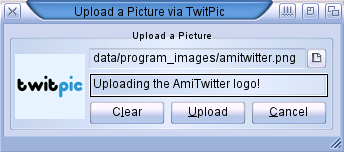
Screen Grab of the new TwitPic interface
Older version history is available here
AmiTwitter currently runs on the following Operating Systems:
- MorphOS
- AmigaOS 3.x (68020+)
- AmigaOS 4.1
It has been successfully tested on: AmigaOS 3.1/030, 3.9/060, 3.9 (WinUAE, AmiKit); MorphOS 2.4, AmigaOS 4.1
You must have the following installed:
Other Requirements:
- gif, png, jpeg, bmp datatypes installed...
- a working TCP/IP stack (tested MiamiDX and Netstack) and be connected to the internet...
- 3.x/4.1: OpenURL (Optional, But necessary for the URLtext.mcc links to function) http://aminet.net/comm/www/OpenURL-7.6.lha
AmigaOS 3.x Version Only:
- ixemul/ixnet libraries ver. 48+ or
more recent versions are here: http://amiga.sourceforge.net/?showpackage=ixemul.library
- Note: Emulation users may require AmiTCP usergroup.library and netinfo.device depending on your system, i.e. AmiKit or WinUAE (run SnoopDos if you have issues...). An install of AmiTCP may correct any issues, even though you will still use the bsdsocket.library emulation to connect to the internet...
Assuming you've met the requirements listed above, just place the entire 'AmiTwitter' directory wherever you'd like on your hard drive. Place the enclosed
libiconv.ixlibary in your system 'Libs' directory and the HTMLtext.mcc and HTMLtext.mcp in your MUI libs directory (if you don't
already have these files installed...)
To use AmiTwitter you must first have an active Twitter account and enter your User Name/Password in the Tools -> Settings dialog and click Save:
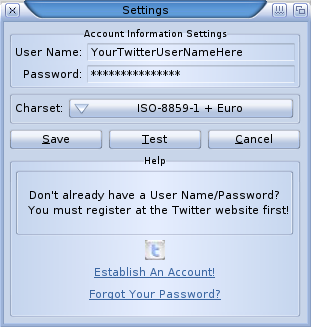
AmiTwitter Settings Screen Grab
Once you have saved your settings you can begin using AmiTwitter. Be sure to check the 'bubble help' if you are unsure of what a part of the program does. Also, I recommend
configuring HTMLtext.mcc to use .ttf fonts (on AmigaOS 3.x you must have freetype2.library installed, properly configured) for a better output display. You can also configure
'TheBar' settings to suit your taste under the 'MUI Prefs' menu item.
The main interface (see below) consists of a Tweet dialog where you can input your message and click enter to send a Tweet, assuming you have an established Twitter
account and have entered and saved your username and password in the Settings dialog as described above. Directly below the Tweet dialog you will find the main interface
buttons (scroll over each to view the 'bubble help') and a window for various dialog messages and the main data output.
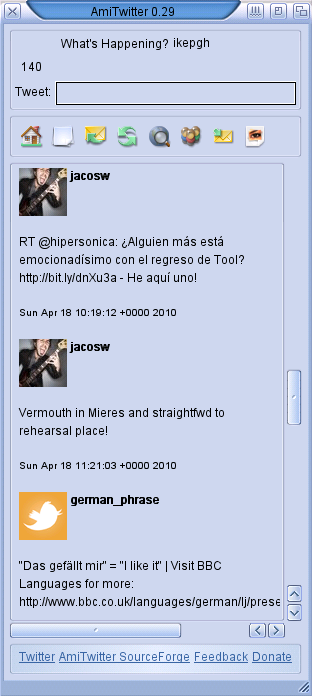
Screen Grab with .png button images and International Character Support
Here are some of the many features that AmiTwitter has:
- Sends Tweets and Direct Messages on the Twitter network
- Downloads Timeline, Retweets of me/by me/to me, @Replies, Favorites Tweets
- Downloads Public Timeline (Random Tweets just for fun...)
- Displays the most recent Tweets that you have sent
- Displays the most recent Tweet by Friends, Followers and Blocking (User ID only)
- Follow/Unfollow, Block/Unblock, Receive/Stop SMS messages from Users
- Update your Twitter website profile
- Display most recent Tweet for any User (whether following them or not! via User ID)
- Displays most recently sent and received Direct Message
- Fully localized program and FAQs
- International Character Support via codesets.library
- TwitPic Support
- MorphOS, AmigaOS 3.x/4.1 compatible
Feel free to jump in and help tackle these issues...
- Search function
- Cache (delete downloaded images)
- AROS version
- HTMLtext improvement
- Many others...
Please see the FAQs menu item for a list of possible answers first. AmiTwitter can be started from the commandline for a more verbose program and error output.
Run SnoopDos/Snoopium to ensure you are not missing any required components. Also, extensive 'bubble help' is available throughout the program...
One of the most common issues is that you get the "Attempting to get the latest..." message which seems to 'hang' and do nothing (see grab below). The most
likely reason is that you don't have anything in that currently selected item. Just click on any other menu item or button and the program will resume
as normal. This occurs because there is nothing on the Twitter server to retrieve for that particular item. Be patient when this message is displayed because
downloading depends on the current speed of the Twitter network.
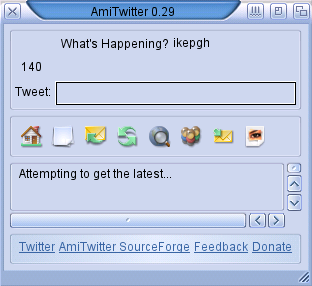
Another common problem is that an ugly background is displayed where your user name and the character countdown is displayed in the BetterString object.
This is somewhat a limitation of the MUI class used, but can easily be corrected by changing the background for the BetterString gadget under AmiTwitter's MUI Settings.
Notice in the screen grab above that they are not a different color when inactive compared to the screen grab below?
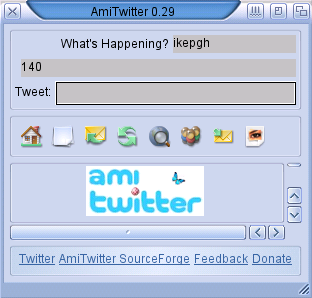
Another problem is that when you upload a picture via TwitPic it hangs forever and then either displays that it was uploaded or displays an error. The most common reason
is that there is not a correct filepath entered (or you clicked without entering any path at all!), however, this will occur also when you try to upload anything other than
a valid .jpg, .gif or .png image, as the TwitPic network will try to upload it, but will eventually reject it! In other words, the program has not crashed, it's trying to
complete your invalid request!
This program is free software; you can redistribute it and/or modify it under the terms of the GNU General Public License as published by the Free Software
Foundation; either version 2 of the License, or (at your option) any later version.
This program is distributed in the hope that it will be useful, but WITHOUT ANY WARRANTY; without even the implied warranty of MERCHANTABILITY or FITNESS
FOR A PARTICULAR PURPOSE. See the GNU General Public License for more details.
This is beta software. Use it entirely at your own risk. I assume no liability for loss of data and/or damage to your machine. You have been warned.
Special thanks to:
- Cyborg, ShInKurO, JahC for contributing to the code
- Sprocki for his testing and very helpful suggestions!
- All the other betatesters
- Dirk Holtwick for the HTMLtext sources
- Catalog translators: Sprocki, L'Ours, Korni, Felix, Luc, Amigo1, Samuli, Samo79, Andreas
- Mason for the button images; Patrick Yung for the new program icons
- All the lib ports, MUI/.mcc, icon authors that made this possible:
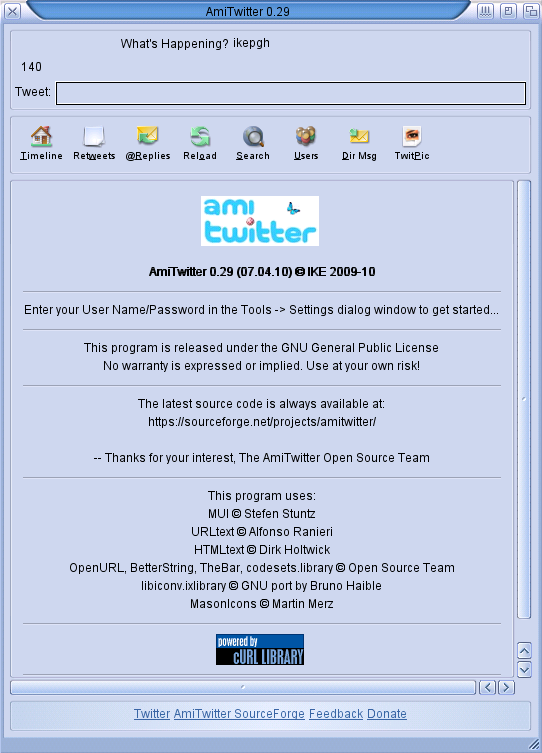
About Window Screen Grab with .png button images and text
So far: Roschmyr, JSiegel (...Your name could be here too!)
- AmiTwitter Donation for IKE
- Cyborg's OS 4.1 version send to paypal: cyborg AT stackswap DOT net
AmiTwitter is © 2009-10 IKE
Send email/feedback to: ikepgh AT ezcyberspace DOT com
Thanks for your interest!
AmiTwitter Open Source Team
Look at some of my other projects and ports @
http://www.ezcyberspace.com/programming.shtml
AmiTwitter is based on the following program:
http://www.cuspy.org/xtwitter/
xTwitter is © 2008 Tsukasa Hamano
[ Operating Systems | Installation Requirements | Installation |
Getting Started | Usage | Features | To Do |
Troubleshooting | License | Thanks | Donations |
Authors ]